
A multi-agent IDE for Claude Code and Codex
Many agents.
One clear view.
Keep several coding efforts in view, with each task in context and your attention on the questions and results that need you.
macOS, Windows and Linux. Built on Herdr. MIT licensed.
How it works
Follow the work.
Return with its context.
- 01
Start in a checkout
Choose Claude Code or Codex and give it a first instruction. Start from an issue to create a worktree for that task.
- 02
See the relationships
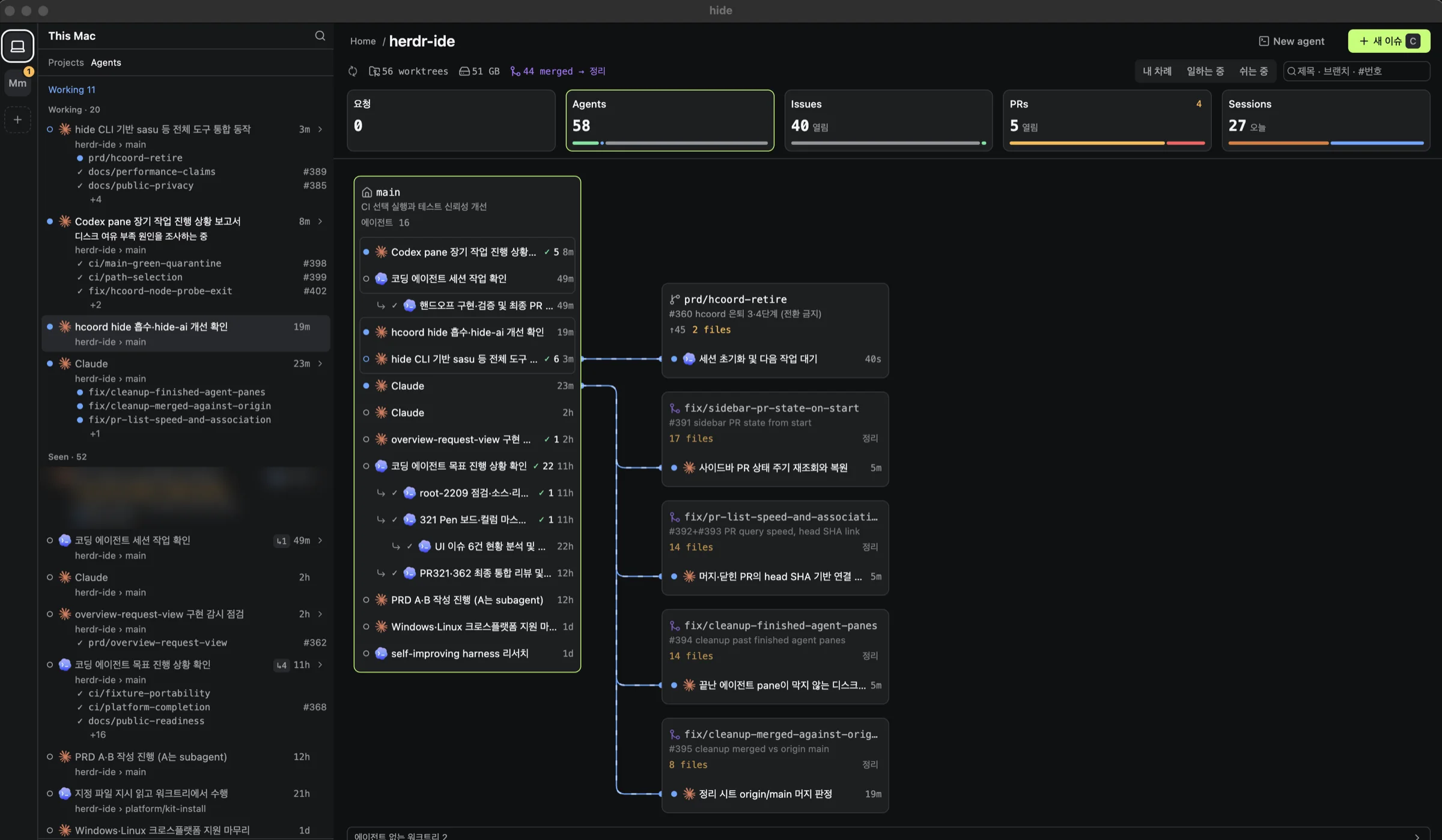
The project overview connects agents to their checkouts and shows delegation between them. Questions and unread results bring attention to the work.
- 03
Open, answer, review
Open an agent's terminal, answer its question, and inspect files, diffs or a page in the same Workspace.
Inside hide
The task and its tools,
kept together.
Attention with a place to act
Agent groups distinguish work that needs you, finished turns, work in progress and work you've seen. Open a row to return to that agent.
See how the work connects
The project overview draws each agent next to its checkout and the agents it delegated to, so you can follow a task without opening every terminal.
- Terminals and review side by side
- Work in live Herdr terminal panes. Open files, diffs and browser pages in a side panel, and pin or split your Views for review.
- Issues through to pull requests
- Track issues by stage and see the checkout, agents and pull request connected to each task. Review remains your decision.
- Find the conversation again
- Browse a local project's Claude Code and Codex session history, with metadata and conversation search across its checkouts.
Measured performance
The numbers,
with their conditions.
A private native candidate on an M4 Pro Mac, measured October 4, 2026. Read the method and limits alongside the results.
- p95, idle input processing
- 16.3 ms
- First renderer keydown to a complete nine-character echo in the terminal buffer, across 50 samples.
- p95, scroll processing
- 99.5 ms
- Wheel event to changed terminal text and the next animation frame after synthetic output, across 50 samples.
- p95 memory, idle / under load
- 549.0 / 622.0 MiB
- RSS summed across the desktop, daemon and private Herdr process trees, from 20 samples in each condition. The load drove three terminal panes.
An unpackaged desktop host with a release daemon. Input timings do not measure physical pixel presentation, and no matched Orca comparison completed.
Full results, method & limitationsGet hide
Choose your setup.
Apple Silicon on macOS 14 or later, Windows x64, or Linux x64. Install your agent CLI and sign in before starting it from hide.
macOS builds are ad-hoc signed and not notarized. Windows and Linux packages are unsigned. Check the SHA-256 file before installing, then follow the platform's first-launch steps.
Installation & platform notesChoose your OS and processor. Only the three setups listed here have packages.
Check the latest release.
Enable JavaScript to check downloads, or use GitHub Releases and the source-install guide below.